Selective Fire 1.0




39
9
39
9
Take full control of your weapon handling with Selective Fire, a lightweight and highly configurable mod that adds realistic fire mode selection to Grand Theft Auto V.
Switch between Full Auto, Burst Fire, and Semi-Automatic firing modes on supported weapons, allowing you to tailor your shooting style to every situation. Selective Fire brings a host of customizability at its core. Including:
Customizable change fire key
Seperated customization for each weapon:
Option to disable the mod
Ability to disable Semi auto and Burst fire
Ability to change the delay between shooting burst fire bursts
Ability to change the delay between shooting semi auto shots
Ability to allow or disable player needing to release fire key before next burst
Set custom burst-fire shot counts
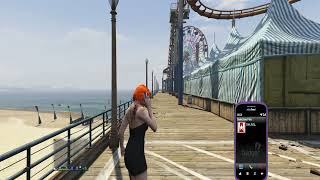
Fully configurable in-game settings throught phone contact and lemonUI menu
For Addon Weapons (as far as ive tested) no manual setup is required. The mod automatically detects addon weapons and allows them to be configured just like standard GTA V firearms, making it ideal for players using large weapon packs or custom weapon mods.
Install Instructions
1. download and Install scripthookv + Scripthookvdotnet (latest Scripthookvdotnet nightly if your on the latest game patch), make sure to set a reload key in scripthookvdontet.ini, preferably Insert
2. create a scripts folder (named scripts and not Scripts) if you havent got one already
3. install LemonUI(if you havnt already got it for SHVDN3) there is a download link in the text file of the zip, copy the url into a browser, then a zip will be downloaded, drag the CONTENTS of the SHVDN3 folder into scripts
4. drag SelectiveFire.dll, SelectiveFire folder, SelectiveFire.pdb into scripts folder
5. You should have contact in your ingame phone contacts called Selective Fire, you should also see three bullet icons next your minimap on weapon that support Selective Fire
Switch between Full Auto, Burst Fire, and Semi-Automatic firing modes on supported weapons, allowing you to tailor your shooting style to every situation. Selective Fire brings a host of customizability at its core. Including:
Customizable change fire key
Seperated customization for each weapon:
Option to disable the mod
Ability to disable Semi auto and Burst fire
Ability to change the delay between shooting burst fire bursts
Ability to change the delay between shooting semi auto shots
Ability to allow or disable player needing to release fire key before next burst
Set custom burst-fire shot counts
Fully configurable in-game settings throught phone contact and lemonUI menu
For Addon Weapons (as far as ive tested) no manual setup is required. The mod automatically detects addon weapons and allows them to be configured just like standard GTA V firearms, making it ideal for players using large weapon packs or custom weapon mods.
Install Instructions
1. download and Install scripthookv + Scripthookvdotnet (latest Scripthookvdotnet nightly if your on the latest game patch), make sure to set a reload key in scripthookvdontet.ini, preferably Insert
2. create a scripts folder (named scripts and not Scripts) if you havent got one already
3. install LemonUI(if you havnt already got it for SHVDN3) there is a download link in the text file of the zip, copy the url into a browser, then a zip will be downloaded, drag the CONTENTS of the SHVDN3 folder into scripts
4. drag SelectiveFire.dll, SelectiveFire folder, SelectiveFire.pdb into scripts folder
5. You should have contact in your ingame phone contacts called Selective Fire, you should also see three bullet icons next your minimap on weapon that support Selective Fire
Първо качено на: преди 10 часа
Последно обновено на: преди 10 часа
Последно изтеглено: Преди 9 минути
1 Коментар
More mods by HKH191:

- Мисии
- Геймплей
- Превозни средства
- .Net
4.85
4 885
96
4.0 (Major Rewrite)
By HKH191
- Геймплей
- Оръжия
4.62
7 938
126
2.0.0 (SHVDN3 Patch)
By HKH191

- Мисии
- Геймплей
- .Net
4.79
4 275
105
2.1 (GTAV Enhanced Support)
By HKH191
Take full control of your weapon handling with Selective Fire, a lightweight and highly configurable mod that adds realistic fire mode selection to Grand Theft Auto V.
Switch between Full Auto, Burst Fire, and Semi-Automatic firing modes on supported weapons, allowing you to tailor your shooting style to every situation. Selective Fire brings a host of customizability at its core. Including:
Customizable change fire key
Seperated customization for each weapon:
Option to disable the mod
Ability to disable Semi auto and Burst fire
Ability to change the delay between shooting burst fire bursts
Ability to change the delay between shooting semi auto shots
Ability to allow or disable player needing to release fire key before next burst
Set custom burst-fire shot counts
Fully configurable in-game settings throught phone contact and lemonUI menu
For Addon Weapons (as far as ive tested) no manual setup is required. The mod automatically detects addon weapons and allows them to be configured just like standard GTA V firearms, making it ideal for players using large weapon packs or custom weapon mods.
Install Instructions
1. download and Install scripthookv + Scripthookvdotnet (latest Scripthookvdotnet nightly if your on the latest game patch), make sure to set a reload key in scripthookvdontet.ini, preferably Insert
2. create a scripts folder (named scripts and not Scripts) if you havent got one already
3. install LemonUI(if you havnt already got it for SHVDN3) there is a download link in the text file of the zip, copy the url into a browser, then a zip will be downloaded, drag the CONTENTS of the SHVDN3 folder into scripts
4. drag SelectiveFire.dll, SelectiveFire folder, SelectiveFire.pdb into scripts folder
5. You should have contact in your ingame phone contacts called Selective Fire, you should also see three bullet icons next your minimap on weapon that support Selective Fire
Switch between Full Auto, Burst Fire, and Semi-Automatic firing modes on supported weapons, allowing you to tailor your shooting style to every situation. Selective Fire brings a host of customizability at its core. Including:
Customizable change fire key
Seperated customization for each weapon:
Option to disable the mod
Ability to disable Semi auto and Burst fire
Ability to change the delay between shooting burst fire bursts
Ability to change the delay between shooting semi auto shots
Ability to allow or disable player needing to release fire key before next burst
Set custom burst-fire shot counts
Fully configurable in-game settings throught phone contact and lemonUI menu
For Addon Weapons (as far as ive tested) no manual setup is required. The mod automatically detects addon weapons and allows them to be configured just like standard GTA V firearms, making it ideal for players using large weapon packs or custom weapon mods.
Install Instructions
1. download and Install scripthookv + Scripthookvdotnet (latest Scripthookvdotnet nightly if your on the latest game patch), make sure to set a reload key in scripthookvdontet.ini, preferably Insert
2. create a scripts folder (named scripts and not Scripts) if you havent got one already
3. install LemonUI(if you havnt already got it for SHVDN3) there is a download link in the text file of the zip, copy the url into a browser, then a zip will be downloaded, drag the CONTENTS of the SHVDN3 folder into scripts
4. drag SelectiveFire.dll, SelectiveFire folder, SelectiveFire.pdb into scripts folder
5. You should have contact in your ingame phone contacts called Selective Fire, you should also see three bullet icons next your minimap on weapon that support Selective Fire
Първо качено на: преди 10 часа
Последно обновено на: преди 10 часа
Последно изтеглено: Преди 9 минути
 5mods on Discord

This file has been approved automatically. If you think this file should not be here for any reason please report it.